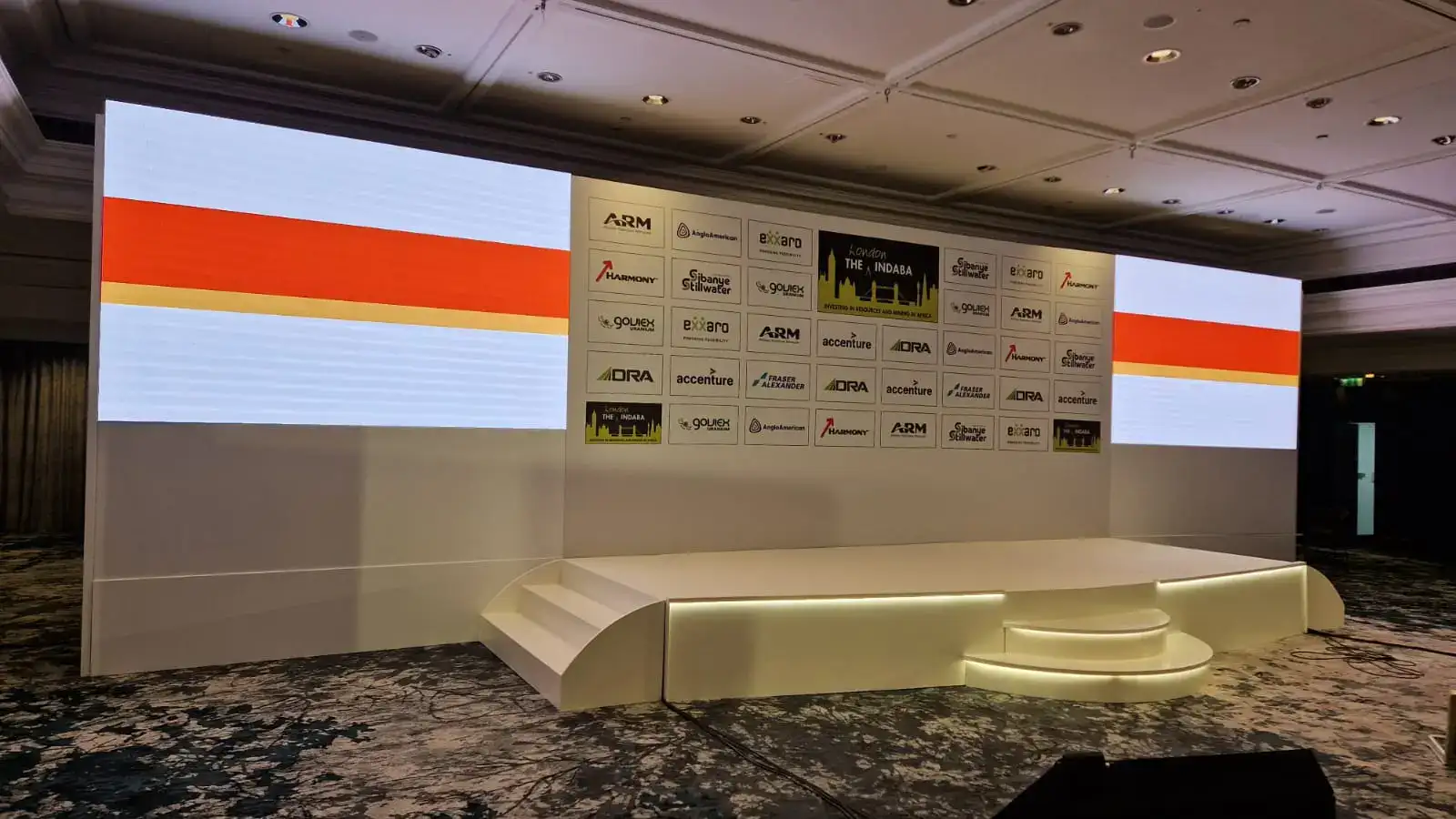
There’s a particular hush that falls the moment the lights dim and a screen fills the stage. In a corporate setting where hush is currency, it’s the attention you pay for and the authority you want to earn. If you’re aiming for formality, clarity, confidence, and a feeling that everything has been considered, an LED video wall can do more than show slides. It becomes the stage’s backbone: the visual frame that gives weight to the message, the backdrop that signals professionalism, and the instrument that makes complex data legible to hundreds at once.
This guide shows you, step-by-step, how to set a formal stage using hired LED video walls, from brief to breakdown, technical choices to creative tips, logistics to run sheets, so your next corporate event looks, sounds and feels like it was meant to be remembered.
Start With The Objective: Formality Means Purpose
Before you choose a screen, decide what the stage must do. Formal corporate stages usually aim to:
- Communicate leadership and authority (annual results, strategy, regulatory announcements).
- Present detailed information (charts, tables, financials) clearly.
- Host speakers and panels with smooth transitions.
- Allow filmed/streamed capture without awkward framing or glare.
If your objective is clarity and gravitas, every technical and creative decision should reinforce that objective. Treat the LED wall as a tool for rigour, not ornament.
Design Brief: Translate The Aim Into Requirements
Write a short, clear brief for the AV supplier and creative team. Include:
- Audience size and layout (theatre, classroom, round tables).
- Venue constraints (ceiling height, mains access, load limits, sightline obstructions).
- Content types (PowerPoint data slides, live video, pre-rendered film, remote feeds).
- Lighting needs (key, fill, backlight).
- Broadcast/recording specifications (frame rates, in-room camera positions).
- Branding and colour guidance (company palette, logo safe zone).
- Accessibility requirements (subtitles, induction loops).
- Run time, number of sessions, and any breakouts requiring secondary screens.
A precise brief avoids guesswork and keeps the stage formally aligned with the message.
Choose The Right LED Video Wall Specs
Not all LED walls are equal. For a corporate, formal event, you’ll want to prioritise clarity, colour fidelity and reliability.
Pixel Pitch & Viewing Distance
- Indoor corporate events (conference halls, ballrooms): Aim for P2.5–P4.0 if the audience sits close (under 6–8m). For larger rooms with longer viewing distances, P4–P6 is acceptable.
- Rule of thumb: Viewing distance (m) ≈ Pixel Pitch (mm) × 3 to 4. Closer audiences need a finer pitch.
Resolution & Size
- Choose a wall resolution that shows data legibly. Large numeric tables and small fonts require high resolution. If you expect detailed charts, scale the screen to allow comfortable reading from the back rows.
- A common corporate solution: 4–6m wide LED wall at ~2–3m high for mid-size auditoriums. Adjust to room proportions.
Brightness & Contrast
- Indoor brightness: 800–1,200 nits is typically fine; ensure capability for stage lighting.
- Contrast: High contrast helps text read crisply; check the panel’s native contrast ratio.
Colour Accuracy & Calibration
- Corporate material often relies on accurate brand colours and charts. Ask suppliers about colour calibration and request an on-site colour check during tech setup.
Frame Rate & Refresh
- Use panels with high refresh rates (≥ 3,840 Hz if cameras are filming the screen) to avoid flicker in live broadcasts.
Modular Design & Aspect Ratio
- Modular LED lets you build wide, cinematic formats or more square corporate screens. Consider using wide-aspect ratios (16:9 or wider) to give a cinematic, authoritative feel, but ensure your slides are formatted to fill the screen (see aspect ratio notes below).
Aspect Ratio And Slide Design: The Little Things That Matter
Formal events look careless when slides don’t fit the screen. Don’t present 4:3 slides on a 16:9 LED wall. Prepare content in the correct aspect ratio, ideally matching the native resolution of the LED wall.
Practical rules:
- Set slides to 16:9 (or the wall’s custom ratio) when designing.
- Use large, simple fonts (sans-serifs like Helvetica, Inter, or Roboto) and avoid dense text. For financial tables, increase font sizes and simplify decimals.
- Leave generous margins; do not place important data within 10% of the edge (LED seams or letterboxing can crop content).
- Test every slide full-screen on the actual wall during tech rehearsal.
Stage Layout And Sightlines
Formality comes from order. A tidy, symmetrical stage reads authoritative and meets practical sightline needs.
- Centre the LED wall behind the podium or main stage area. If using a long stage for panellists, use the LED as the central visual spine and add subsidiary side screens for peripheral sightlines.
- Stage height: 0.6–1.0m is a typical corporate height to allow visibility while maintaining intimacy.
- Podium placement: To one side of the screen for camera-friendly angles, or centred if the speaker uses the full screen. Keep clear walkways and mark safe speaker zones.
- Audience rake: If possible, ensure a slight rake or elevated seating for clear sightlines.
Lighting: Make The Presenter And Screen Play Together
Good lighting distinguishes a professional stage from an amateur one.
- Key light on presenters (soft, flattering). Use LED fresnels with diffusion.
- Backlight/hair light to separate presenters from the screen and avoid silhouette.
- Screen wash: Avoid spilling strong stage front light directly onto the LED surface; instead, aim lighting to illuminate the presenter while minimising reflections on the wall.
- Dimming & blackout: Ability to dim house lights gives cinematic focus to the screen; ensures emergency lighting and sightline safety.
Lighting should be programmed into the run sheet: house rise/fade, presentation mode, Q&A mode, applause.
Audio: The Formal Stage Needs Clear, Even Sound
Clarity of message is as much about sound as it is about image.
- Line-array PA for larger halls; nearfield speakers for intimate venues. Delay fills for large rooms to ensure synchronous sound.
- Microphone choices: Lapel (lavalier) mics for hands-free, handheld for Q&A, and boundary mics for panel tables. Use redundant wireless channels to avoid dropouts.
- Monitors for presenters: Confidence monitors or a teleprompter help speakers maintain eye contact while following slides and notes. These should be positioned so speakers don’t turn their backs to the audience.
Sound delays, echo, or uneven coverage undermine formality more quickly than a dull backdrop.
Content And Motion Design: Formal ≠ Static
A formal stage can still be cinematic. The trick is restrained motion.
- Opener: A crisp animated opener (20–40 seconds) with brand colours and a clear title sets the tone. Keep transitions short and dignified.
- Lower-thirds & data overlays: Clean, minimal lower-thirds for speaker names and titles. For charts, animate subtly; no unnecessary swooshes.
- Standby visuals: Have elegant standby slides (brand gradient, subtle texture) to use during transitions or tech pauses.
- Video playback: Encode in native resolution of the wall; use high-bit-rate H.264/HEVC and test for audio sync.
Avoid over-design: in formal contexts, less movement conveys more authority.
Rigging, Safety And Power Planning
Corporate clients expect zero surprises. Make safety and logistics invisible.
- Rigging checks: Ensure the LED wall rigging fits within the venue’s load limits; get the engineer’s sign-off.
- Power: LED walls and lighting are power-hungry. Map out mains access, generator needs, and dedicated distribution boards with RCDs.
- Cable routing: Hide cables, use ramps for audience crossings, and clearly label all cable ends.
- Redundancy: Have backup sources, spare media players, spare wireless mic packs, and a secondary video input path.
Confirm all of this in writing with your AV supplier before the event.
Technical Rehearsal: The Formal Stage Earns Its Polish Here
Rehearsal is where payoffs are made.
- Full tech run: Play every asset at native resolution; check colour, sync audio, verify camera feeds for live streams.
- Speaker run-through: Let every speaker rehearse with confidence monitors and lapel mics. Time their segments. Confirm handover cues.
- Dry runs for transitions: Iterate the fade timings between slides, videos, and live cameras so transitions are seamless.
- Emergency procedure drill: Ensure the team knows the contingency plan; what to do if playback fails, if a mic dies, or if a power trip occurs.
A well-rehearsed event looks effortless because you’ve planned for the problems.
Accessibility And Filming Considerations
A formal corporate stage is inclusive and film-ready.
- Subtitles/captions: For live streams or large rooms, provide real-time captions (human or auto-assisted) displayed on the LED or a side monitor.
- Audio loops: Induction loops assist attendees with hearing aids.
- Camera-safe visuals: Avoid high-contrast flicker and excessive refresh patterns. Confirm panel refresh rates to prevent camera banding.
- Clear paths: Wheelchair access, ramps, and accessible seating positions must be planned and signposted.
Accessibility is professionalism; make it part of the brief.
Budgeting: Where To Invest
Formal staging needs investment in a few non-negotiables:
- Quality LED panels & technician crew (don’t cheap out on pixel pitch or support staff).
- Professional lighting rig with programmable desk operator.
- Robust audio with redundancy.
- Content creation (motion design, branded lower-thirds).
Allocate roughly 50–60% of your production budget to AV and technical crew for formal corporate events. The remaining covers staging, furniture, talent and hospitality.
Day-Of Checklist (Summary)
- Confirm LED wall power, panel calibration and pixel pitch.
- Test every input (laptop, playback device, live feed).
- Check speaker mics, batteries, and monitor feeds.
- Run a full film/video test.
- Confirm lighting cues and house lights.
- Ensure safety inspector sign-off on rigging & power.
- Final walk with the emcee and stage manager for cue timings.
Sample Stage Layouts (Quick Sketches In Words)
- Single-centre LED wall + podium: Best for keynotes. LED centred, podium slightly off-centre for camera angles.
- Wide LED + stage seating: For panels, a wide central LED with nameplates and subtle desk lighting.
- LED backdrop + side confidence monitors: For investor meetings, main wall for charts, side monitors for presenter notes.
Ask your supplier to provide laser-measured sightline plans if in doubt.
FAQs: Quick Practical Answers
How Early Should The LED Wall Be Installed?
Ideally, the day before or at least 6–8 hours before show call to allow for calibration and tests.
Can My Laptop Drive The LED Wall Directly?
For corporate reliability, use a dedicated media server or scaler. Laptops are for rehearsal; a pro media player reduces risk.
What If The Slides Don’t Fit The Screen?
Prepare slides in the wall’s exact aspect ratio. If that’s not possible, set up letterboxing or safe zones and test during tech.
Formality Is A Series Of Small Certainties
A formal corporate stage is not an accident. It’s the sum of tiny decisions, correct pixel pitch, the right ratio, a calibrated colour, an unobtrusive lighting plan, rehearsed handovers, all made with the singular aim of letting the message land. An LED video wall hire is the most visible part of that system; hire it with an eye for precision and you’ll buy attention back in full.
